Wednesday, July 30, 2008

Crocheted Hair Clips

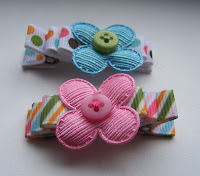
As promised, here are the instructions for making the crocheted hair clips featured in this week's giveaway.

For crochet instructions try www.hassdesign.com/StitchLegend. There you can find videos showing you how to do each stitch.

Skill level: Beginner (I highly recommend this as a first time project because you can see the fruits of your labor so quickly which is always encouraging.)

Supplies:
Crochet thread (your choice of colors)
Size US 5 crochet hook
3/8" Ribbon (I prefer grosgrain.)
1 7/8" double pronged alligator clip or something similar (I got mine at Minor Details. They were great to work with and arrived within a week.)
Glue gun


Abbreviations
:
ch = chain
beg = beginning
sc = single crochet
sl st = slip stitch
hdc = half double crochet
dc = double crochet
tr = treble crochet
* = repeat between *'s

Small Flower
:
ch 6, join to beg ch with sl st to form a ring

Round 1: ch 1 (counts as first sc), 14 sc in ring, join to beg sc with sl st = 15 sc

Round 2: ch 1, *sc in first sc, hdc in same stitch, 2 dc in next sc, hdc in next sc, sc in same stitch, repeat from * around
join to beg sc with sl st = five petals

Finish off

Large Flower:


ch 5, join to beg ch with sl st to form a ring

Round 1: ch 1 (counts as first sc), 11 sc in ring, join to beg sc with sl st = 12 sc

Round 2: ch 1, sc in same st, *ch 3, skip next sc, sc in next sc, repeat from * four times more, ch 3, join with sl st to beg sc = 6 "ch 3" spaces

Round 3: in each ch 3 space work 1 sc, 2 dc, 3 tr, 2 dc, 1 sc, join with a sl st to first sc = 6 petals

Finish off.

(This is the first crochet pattern I've written, so if you find mistakes, let me know and I'll correct them.)

Putting it all together
:
Cut 3" of ribbon. On each end of the ribbon, fold about 1/4" to the backside and secure with a dab of hot glue.

Glue ribbon to clip as shown in the picture. (Picture is a side view.)

Glue small flower on top of large flower. Glue flowers to clip.

Tuesday, July 29, 2008

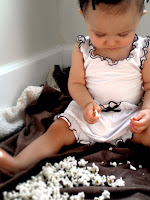
Popcorn Bloomer and Blouse GIVEAWAY !!!!!!!

Popcorn Bloomer and Blouse GIVEAWAY !!!!!!!

I love the ruffles on this set. So cute.

Monday, July 28, 2008

Because I Was Taught to Share


Because I Was Taught to Share

This is one of my recent favorites blogs. The kind I check daily. It's a great place to find free stuff on the internet, all collected in one place. I'm so glad she was taught to share because I love the things she shares!

Digital Scrapbooking


I haven't gotten into digital scrapbooking yet, but I'd love to soon. It seems right up my alley. Summer of Summertime Designs makes it really easy to get started too. She makes these adorable scrapbook "papers" and embellishments and gives them away for free! Check her out!

Saturday, July 26, 2008

Hair Clip Giveaway!

Following in the footsteps of Grosgrain, I'm doing my first giveaway! Yippee! The prize? These cute hair clips! I've been seeing these everywhere and kept thinking, "I can do that!" so I finally stopped thinking and actually did it. I like them, and I hope you do too.

Here's how to enter the giveaway:
Add link to this post on your blog or personal website. If you use Blogger it's really simple, just click where it says "Links to this Post" at the bottom of this post, then click where it says "Create a Link," follow Blogger's instructions, and "shazam," you're done. If you don't use Blogger, no worries. Just create a link on your page as you normally would. I should be able to see it, but just in case, leave a comment telling me where to find your link, and I'll count you in.

No blog, still no worries. You can enter the drawing by adding a comment to this post. Just click the "comments" button located at the bottom of this post, write something nice (please), and click "Publish your comment." You're in.

Oh yeah, if you add a link AND leave a comment, I'll put your name in twice!

LAST DAY TO ENTER is Tuesday AUGUST 5, 2008. The winner will be announced the next morning, Wednesday the 6th.


So that everyone ends up a winner, I'll post the instructions for these clips as soon as I can. Keep checking back. Good luck!

Clip Giveaway

Here's a cute clip giveaway. I'm crossing my fingers.

http://babybands.blogspot.com/2008/07/my-first-giveaway.html

Friday, July 25, 2008

Darling Skirt Giveaway

Keep crossing those fingers for me there's another giveaway from Grosgrain. Kathleen must have fingers like lightning!

I love the bird fabric and the fact that this is reversible! How clever.

Reverisble Bird Seed Skirt GIVEAWAY!!!!

Saturday, July 19, 2008

First Dress

Okay, so I know I don't have any little girls yet, but I love little girls' clothing. Lately, I've been so inspired by Kathleen of GrosgrainFabulous and the SugarCityJournal women. Grosgrain really pushed me over the edge this week, and I actually started a dress! In fact, I'm sewing two identical dresses! If they turn out well, I may actually do a giveaway of my own just like Kathleen. No matter what, one dress is going into my little girl hope chest for sure.

The inspiration for these dresses comes from:
The train stop shirt dress from Grosgrain pictured in my last post,
this darling coat I found on Angry Chicken, and
this village frock from Sugar City.

Thursday, July 17, 2008

Another Darling Dress!

I can't believe Kathleen has another fabulous dress up so soon! She sews like the wind! This one is absolutely darling.


Train Stop Shirt Dress GIVEAWAY!!!!!!!

I have been so inspired by her this week that I can't sleep at night. I keep thinking of all these projects I want to do. Reading her profile about starting to "really" sew again has made me so enthusiastic and hopeful. If she can do all this with two girls to care for, what's stopping me? In fact, my sewing machine is sitting in my kitchen calling to me at this moment. (Someday I'll be more than just a refugee seamstress and crafter wandering through my home looking for a place to create. I can almost picture my workroom now.)

Keep crossing those fingers for me!

Tuesday, July 15, 2008

Darling Dresses

I just found another blog to love, grosgrainfabulous.blogspot.com. Kathleen Dougherty is the author and does some amazingly adorable stuff as a stay-at-home mom. I don't know her yet, but I think she definitely falls into the category of "kindred spirit."

Here's a darling dress she created for her daughters' birthday celebration. I'm hoping to win it. Cross your fingers for me!

Pinata Pinafore GIVEAWAY!!!!!!!

Saturday, July 12, 2008

July Layout

So here's what I have so far for July's layout. I like it well enough to make it live, but I'm not sure it's quite what I want. If you have any ideas on how to spice it up, let me know.

I'm rather pleased with the title box. I've always loved striped socks. (If any of you get my name for Christmas, a pair of tall striped stockings would be great :)

There are two parts of my fashion personality vying for my retail attention. First there's the Audrey Hepburn side that wants to be refined and classy. And then...there's the artsy side that wants to be bohemian, colorful, quasi-emo, and fun all at the same time. It's the artsy side that makes me walk past the striped tights at the mall twice. It's my all-too-empty pocket book that keeps me walking. In hindsight, I guess this picture kind of merges those two parts together.

I used the following pictures to create my title:


(The gray striped socks are from chocosho.com. I found them using google's image search.)

For those of you out there interested in Photoshop, here's how I did it. First, I increased the saturation on the skirt to make it a striking red, and then combined the pictures, beginning by cutting out the gray striped legs and pasting them on a white background. The quick selection tool in Photoshop CS3 was a huge help in selecting the legs especially after I realized I could refine the edges using the menu at the top. (You could use the magnetic lasso tool also.) I then saved the legs selection using the option under the select menu. This now-saved selection comes into play later.

Next, I used the magnetic lasso with a feather of 1 or 2 px to select the skirt and paste it on a layer above the gray legs and resized it to fit. Then, I re-loaded my saved legs selection using the select menu so that the legs were again outlined. With the skirt layer still highlighted, I erased the parts of the skirt that overlapped the legs. Using the loaded selection kept me from erasing too much.

Here's where it got a little more involved. First, I selected the inverse using shift-apple-I (or control-shift-I on a PC) so that everything but the legs was selected. Then, I cloned parts of the skirt to make up for the places where the skirt and legs didn't match up. Having the inverse selected kept me from accidentally cloning over what I had just erased.

It still looked pasted together so I added a new layer and painted red using a soft brush and a low opacity over the tights where I thought the red of the skirt would have reflected onto them in real life. I also painted a little red on parts of the skirt where it was too white. I cleaned up the edges with the eraser and changed the layer mode to "multiply" to let the lower layers shine through. I also decreased the opacity of the red painted layer.

Then I flattened the image and used the clone tool to clean up the edges where the legs still had a white halo.
Related Posts with Thumbnails